

Hire the Best Ecommerce Web Designers
Work with the world's best ecommerce web designers. Explore our curated marketplace of top-rated freelance talent trusted by global brands.
Find your Ecommerce Web Designer on Dribbble



























Discover more Freelance Ecommerce Web Designers on Dribbble






 Art by Karen Novelo
The Dribbble Standard
Dribbble is the creative marketplace where businesses discover, hire, and pay leading designers and agencies with community-validated portfolios since 2009. Clients, from startup founders to global brands, trust our human-first ecosystem for finding designers.
What sets Dribbble apart:
- Strong community of design experts ready for hire
- Verified experience and skill sets
- Direct access to eCommerce Web Designers and agencies
Top eCommerce Web Design profiles showcase real work, giving you confidence in both craft and capability.
The Definitive Guide To Hiring eCommerce Web Designers
What Does an eCommerce Web Designer Do?
An eCommerce web designer creates the pages and interactions customers use to browse products and complete purchases. This includes product pages, collection pages, search and filtering, carts, and checkout flows.
They design how product images, variants, pricing, reviews, shipping information, and returns content appear throughout the shopping journey. They also make sure these elements remain clear across desktop and mobile.
Strong eCommerce design balances branding with usability. Designers work within the limits of the eCommerce platform while making products easy to find, compare, and buy.
Why Hire an eCommerce Web Designer?
An eCommerce web designer brings specific experience with the pages and interactions that shape the online shopping journey.
eCommerce web designers can help:
- Design a product detail page that handles variants, discounts, and out-of-stock states
- Build a faceted filter system that stays usable as the catalogue grows
- Improve checkout usability across address, delivery, and payment steps
- Specify product photography requirements, counts, and aspect ratios for the merchandising team
- Place trust signals, shipping timelines, and returns terms where buying decisions happen
- Design a mobile-first buying flow with a persistent add-to-cart action
- Merchandise subscriptions, bundles, and quantity breaks without confusing the price display
- Design post-purchase confirmation, order tracking, and returns pages that reduce support tickets
- Design empty search results and zero-inventory states so dead ends still offer a next step
How to Hire an eCommerce Web Designer
Step 1: Define your catalogue, platform, and conversion problem
Write down the number of SKUs, how many variant dimensions a typical product carries, whether you sell one-time purchases, subscriptions, or both, and which platform the store runs on today. Then name the specific step that is losing people, since a store leaking at the collection page needs different work from one leaking at payment.
Pro tip: Pull your current conversion rate split by device before briefing anyone. A gap between desktop and mobile conversion tells a designer exactly which templates to open first.
Step 2: Review eCommerce web designer portfolios
Look for live storefronts rather than product page mockups. A single beautifully composed product shot proves nothing about how the template behaves for a product with six variants, a long compliance disclaimer, and no lifestyle photography.
Pro tip: Open a candidate’s live store on a phone and try to buy something cheap. The steps where you hesitate are the steps their next client will hesitate at too.
Step 3: Evaluate their process
Ask how they decide which facets belong in a filter panel, how they handle a product with inconsistent imagery, what they do when a merchant has no reviews yet, how they design for a checkout the platform will not let them fully customize, and how they approach international pricing and delivery messaging.
Pro tip: Ask what they would remove from your current product page. A designer who names a specific element and explains what it is costing you is thinking about the sale, not the layout.
Step 4: Align on the scope and timeline
Confirm which templates are in scope rather than counting pages, since a collection template covers hundreds of URLs. Agree who supplies and retouches product photography, who writes product copy, how many revision rounds are included, what the developer handoff contains, whether third-party app or extension licences are your cost, and who is responsible for testing the finished checkout with a real transaction.
Pro tip: Fix the photography specification in writing before design starts, including image count, aspect ratio, and background treatment. Product imagery arriving late or inconsistent is the most common reason a storefront build slips.
Cost of Hiring an Ecommerce Web Designer
Freelance eCommerce web designers typically charge $25–$150 per hour, depending on experience, specialization, and location.
- Junior freelancer: $25–$45 per hour
- Mid-level freelancer: $50–$85 per hour
- eCommerce specialist: $90–$150+ per hour
Common freelance project rates include:
- eCommerce store: $3,000–$15,000
- Template-based storefront: $3,000–$6,000
- Custom storefront: $6,000–$15,000
- Product or campaign landing page: $500–$3,000
Ongoing maintenance typically costs $200–$650 per month.
Price depends on catalog complexity, product variants, filtering requirements, subscriptions or bundles, checkout customization, content requirements, currencies, and delivery regions.
Freelance eCommerce Web Designer vs Web Design Company
The main difference is scope: a freelance ecommerce web designer focuses on a defined storefront or shopping experience, while a web design company can support broader strategy, content, design, and implementation.
| Factor | Freelance eCommerce Web Designer | Web Design Company |
|---|---|---|
| Best for | Product, collection, and checkout templates designed by one specialist | A full storefront programme covering brand, content, and ongoing campaigns |
| Typical scope | Buying flow design, filter and search design, and developer-ready templates | Merchandising strategy, photography direction, build, integrations, and retention work |
| Communication | Direct access to the designer | Communication with a multidisciplinary team |
| Flexibility | Often more flexible | More structured process |
| Team | Usually one specialist | Multiple creative specialists |
| Choose when | Your catalogue and platform are settled and conversion is the problem | You are launching a brand and need photography, copy, and campaigns handled too |
Featured eCommerce Web Designer Success Story
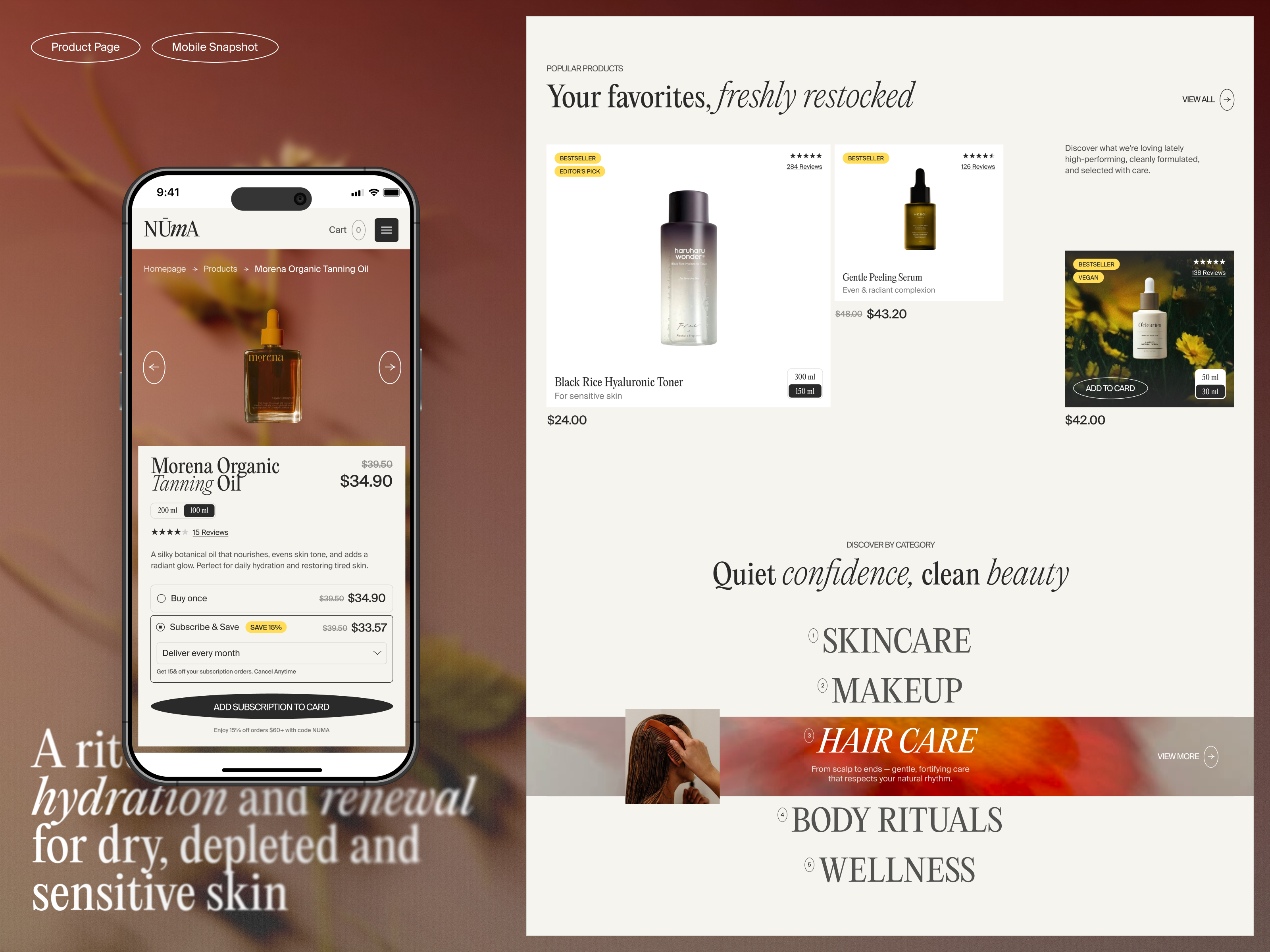
Dribbble gives eCommerce web designers a platform to show how product presentation, navigation, and visual hierarchy come together in an online shopping experience. This featured project demonstrates a clean storefront designed around skincare products and easy product discovery.
Explore: Skincare eCommerce Design | Shopify Website by Gulshan Ali
- Challenge: Create an ecommerce experience for a skincare brand that presents products clearly while maintaining a polished, cohesive visual identity.
- Solution: Gulshan Ali designed a Shopify-focused storefront using a restrained visual system, product-led layouts, and clear hierarchy to support browsing and product discovery.
- Result: The finished concept demonstrates a cohesive ecommerce website direction that keeps the skincare products central and supports a clear path through the storefront.
Related eCommerce Web Design Resources
How To Hire A Professional Ecommerce Web Designer on Dribbble
Use InstantMatch to connect with the right designer fast.
-
Step 1
Submit your Project Brief
-
Step 2
Get Matched with Vetted designers
-
Step 3
Start your project
Frequently Asked Questions on Hiring Ecommerce Web Designers
Ideally, yes. Shopify, WooCommerce, BigCommerce, and other platforms have different themes, page structures, checkout limitations, and customization options. A designer who knows your platform can create designs that are realistic to implement and work within its constraints.
Yes. Many eCommerce redesigns improve the existing storefront rather than move it to another platform. A designer can restructure navigation, product and collection pages, merchandising, cart flows, and visual design while keeping the current eCommerce system in place.
A designer can make products easier to discover and evaluate, simplify navigation, improve product pages, reduce friction in the cart and checkout, and make calls to action clearer. Strong eCommerce UX considers the entire journey from landing on the store to completing a purchase.
A large part of online shopping happens on smaller screens, where crowded navigation, difficult product browsing, and cumbersome checkout steps can quickly create friction. Look for a designer who treats mobile as a core shopping experience and can show responsive eCommerce work in their portfolio.
Browse eCommerce Web Designer profiles on Dribbble or use InstantMatch to quickly connect with vetted eCommerce Web Designers who fit your catalogue size, platform constraints, and timeline.
Have another question? Check out the Dribbble Help Center for more answers.


