About the Authors:
Garik Avetisyan, Davit Gabrielyan, and Anastasia Saroka are co-founders of Flexy Global, a design and development partner for startups and global enterprises. Garik built and successfully exited a consumer app used by millions. Davit brings 15 years of experience leading complex projects and operations at international companies including Orange and Coca-Cola Hellenic. Anastasia, Design Director at Flexy Global, brings experience designing products for large corporations and startups in the fitness industry. Together, they are guided by the belief that advanced technology creates greater value when people can understand it, trust it, and use it confidently.
About 95% of enterprise generative AI pilots studied by MIT’s NANDA initiative delivered no measurable return.
The number points to a problem beyond model quality. An AI system can perform well in a demonstration, be deployed across a company, and still contribute little to the work it was meant to improve.
Daily usage does not necessarily prove otherwise. Employees may be required to use a tool while continuing to verify its answers elsewhere, ignore its recommendations, or build workarounds around it. The system is being used, but it has not earned a meaningful role in the decision.
Over the past two years, our team at Flexy has designed AI for compliance reviews, contact center conversations, investment decisions, and other workflows where a wrong answer can create customer, financial, or regulatory risk. Across that work, we learned that model performance is only part of the design challenge. The interface must also help people understand what the system knows, where its authority ends, and what to do when the answer does not look right.
Here are five decisions that changed how we design enterprise AI.
1. Make every recommendation traceable.
In enterprise AI, the most important experience often begins after the answer appears.
Every recommendation needs to be traceable. A compliance officer, financial specialist, or contact center agent should be able to open the trace report, follow the evidence chain back to its source, and understand which rules, documents, or signals shaped the output. The interface needs to provide a clear audit trail, not simply a polished final answer.
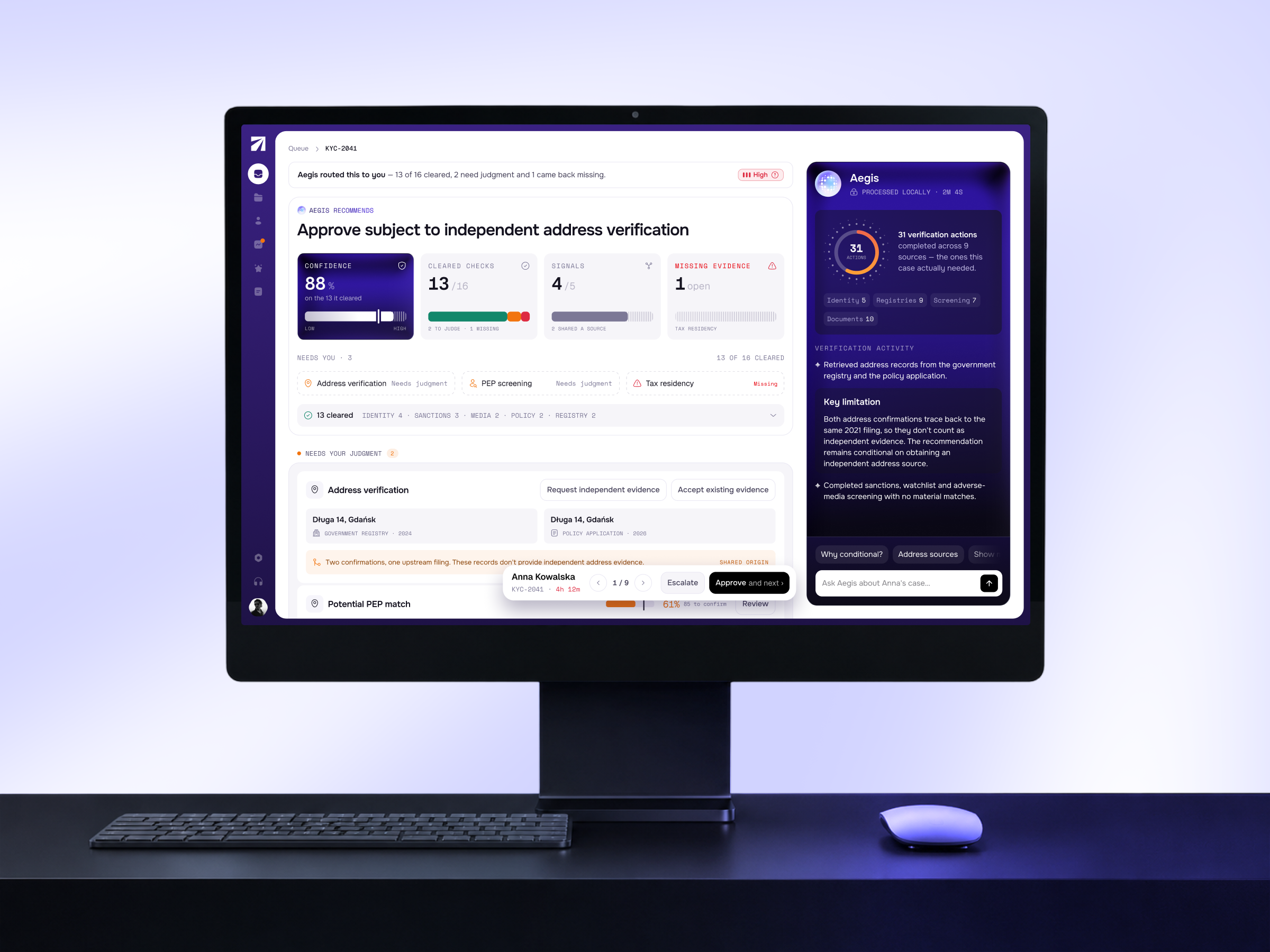
This principle shaped the KYC compliance agent we built for a European insurance group. Compliance officers had been working across fragmented internal systems, external registries, archived files, and documents in several languages. They manually reconciled identity, policy, and risk information, then reconstructed the reasoning trail if a decision was audited later.
The system we designed brings those sources into one workflow. It uses more than 200 verification and enrichment tools to cross-check information and prepare a structured KYC assessment. Each conclusion is connected to a risk score, supporting evidence, and its original source. The officer can inspect the assessment and focus on the exceptions that require professional judgment.
The design question was not how much of the system’s reasoning we could display. It was what the officer needed to verify the recommendation. The final hierarchy therefore gives priority to the assessment, the evidence that shaped it, any discrepancy that could change the outcome, and the source record. The complete trace remains available without competing with the immediate review task.
This is trust calibration in practice. The interface gives people enough evidence to evaluate the output without presenting more confidence than the system has earned.

2. Give AI clear boundaries.
AI autonomy should be calibrated at the action level.
A system may safely collect documents, normalize information, and flag discrepancies. Actions affecting a customer’s identity, eligibility, finances, or access should not be executed with the same level of autonomy.
Our working rule is straightforward. As the potential impact of an error increases, the agent’s decision-making autonomy should decrease, with mandatory human review before execution.
In the KYC workflow, the agent handles much of the repetitive verification while the compliance officer reviews the evidence and approves the assessment. This is human-in-the-loop design with a defined control point. The person steps in where context, accountability, or professional judgment matters.
Design for agents. Design for humans. Keep the difference.
An agent needs context, tools, permissions, and a defined goal. A person needs evidence, control, and a clear recovery path when the system gets something wrong. Good AI interface design makes both sets of needs visible and keeps ownership of the final decision unambiguous.
3. Put AI where the work happens.
Enterprise teams already move between too many systems. If AI becomes another destination they have to remember to open, it adds friction before it adds value.
The better approach is to place assistance inside the workflow, at the moment the user needs it.
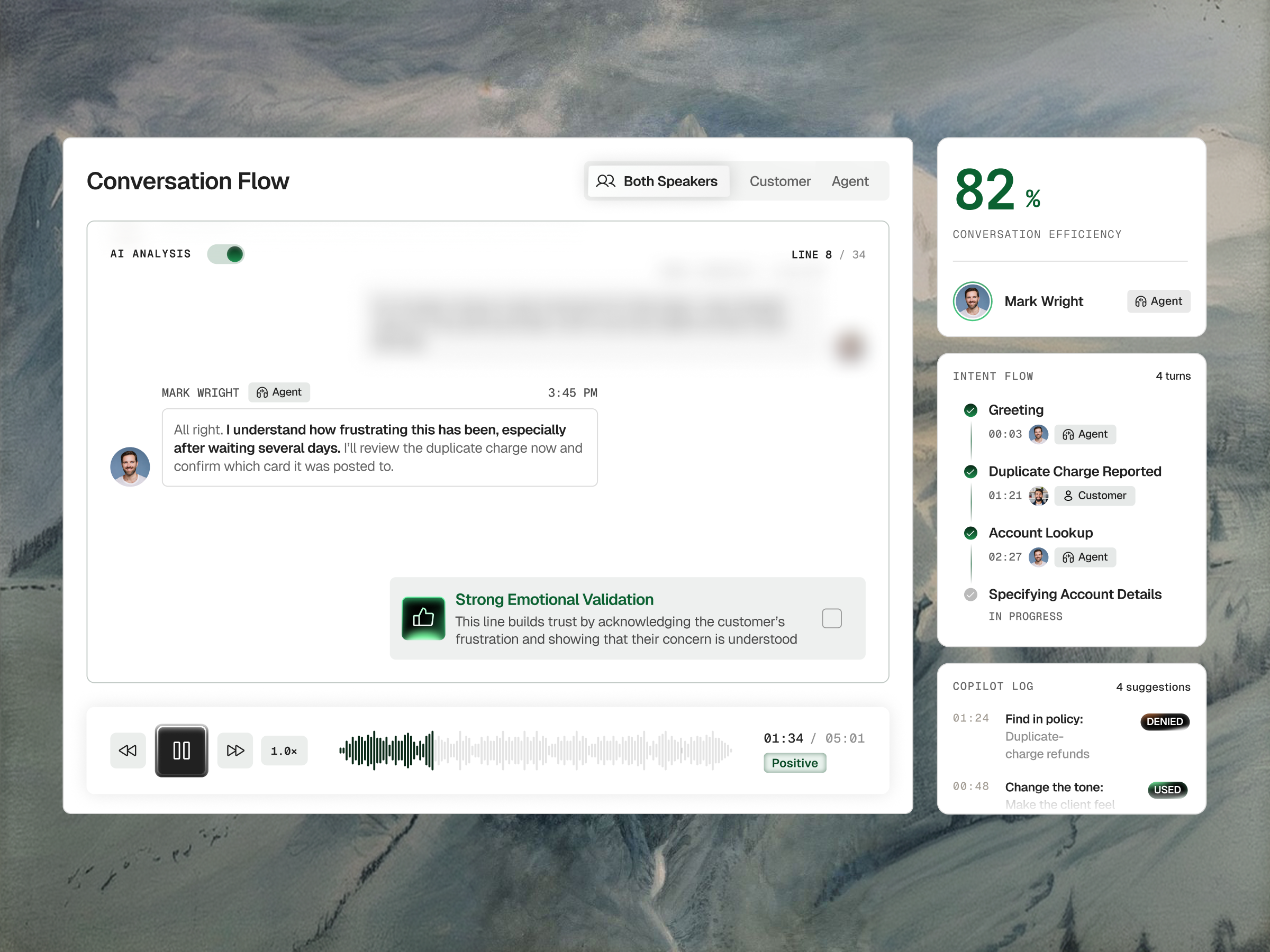
We followed this principle when building a real-time AI copilot for a bank’s contact center. Before the copilot, agents had to listen to the customer, track changing intent, recall internal procedures, and search policy documents during the same conversation. Two people handling a similar request could reach different answers depending on their experience and how quickly they found the right information.
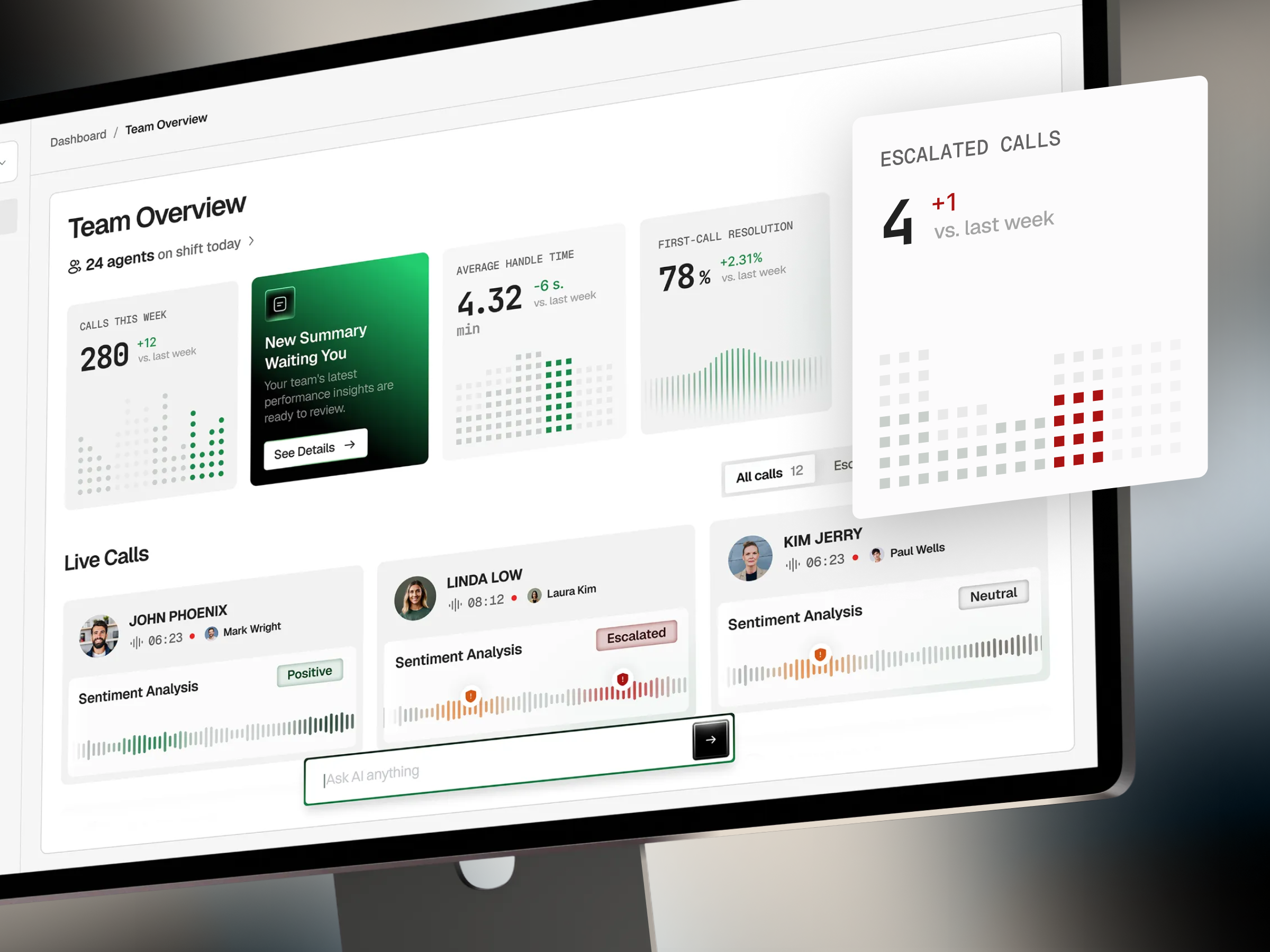
The copilot works within the live call. It transcribes the conversation, separates the speakers, follows changes in intent, retrieves relevant information from approved internal sources, and surfaces a suggested resolution inside the contact center interface.
For our designers, the main constraint was attention. The interface could not compete with the customer for the agent’s focus. The current intent, suggested action, and supporting source had to be understood at a glance.
A correct recommendation that arrives too late, takes too long to read, or sends the agent into another screen is not useful during a live conversation. Timing and hierarchy are not finishing touches here. They determine whether the AI can support the work at all.
This is agentic UX in practice. The system completes several connected steps behind the scenes while the service decision remains with the contact center agent.
4. Design the agent, not just the screen.
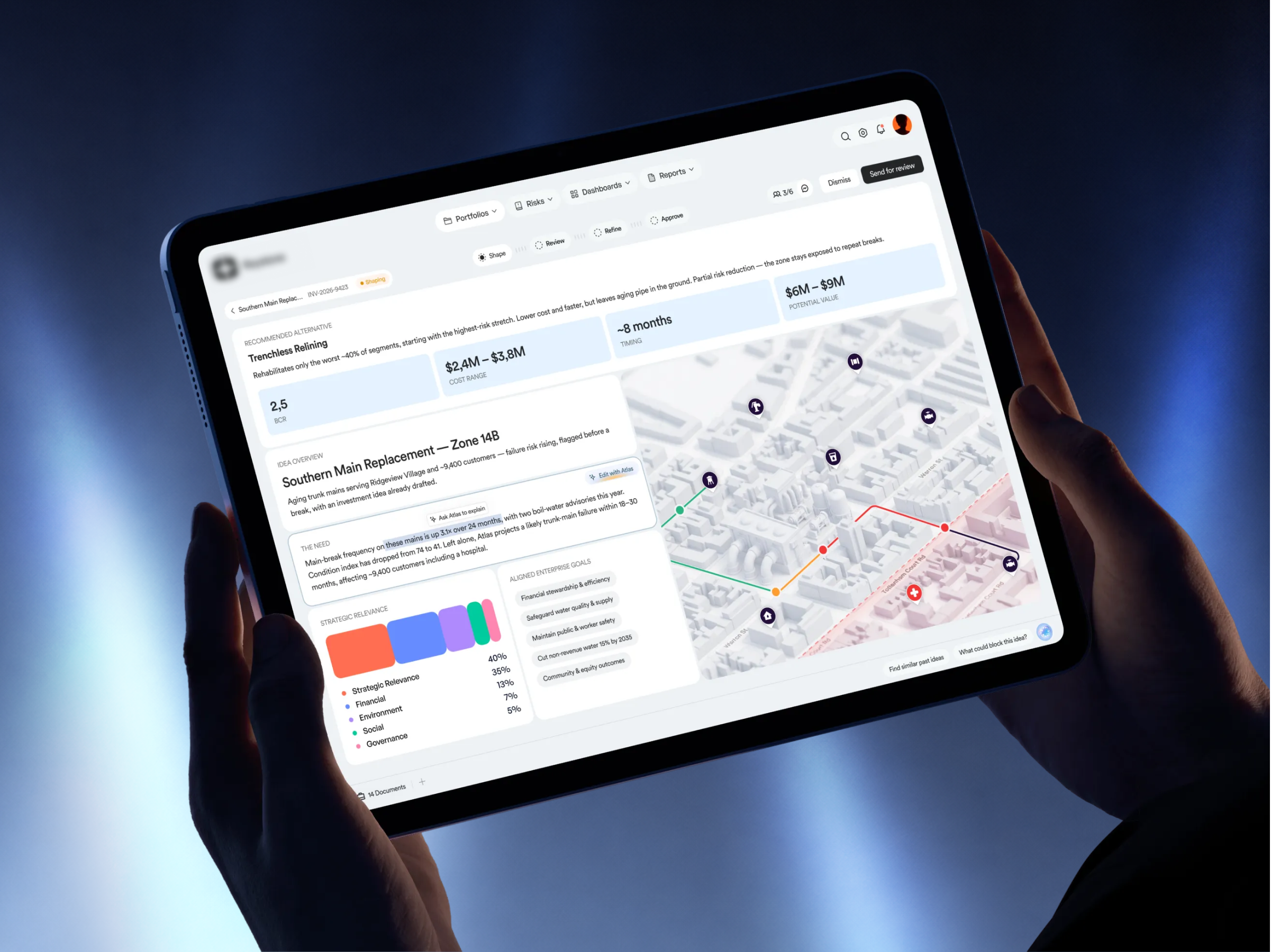
Enterprise AI UX extends beyond layout and visual hierarchy. The agent’s name, voice, prompts, response structure, evidence, uncertainty, and recovery behavior are all part of the experience.
This becomes especially important when different departments introduce AI independently. Finance may have one assistant, HR another, and customer support a third. Even if they use the same visual components, they can feel unrelated when they have inconsistent names, speak in different voices, structure answers differently, or express confidence in conflicting ways.
The question many design teams are asking: Has anyone successfully integrated AI into a large enterprise design-system workflow? The answer requires more than adding an AI component to a design library. Consistency must extend to how agents identify themselves, explain recommendations, ask for confirmation, escalate uncertainty, and respond when they cannot produce a dependable answer.
This changes the designer’s role. Enterprise AI designers help shape the end-to-end experience, including agent naming and character, voice and tone, prompting and response quality, evidence presentation, feedback mechanisms, and recovery paths. They also help define how corrections, overrides, and user feedback are captured so those signals can support continuous evaluation and improvement.
The interface is no longer only the screen. It includes everything the agent says, does, and learns from.
5. Test whether people know when to trust it.
A completed task does not prove that the user understood the AI.
Someone may accept a recommendation because it looks polished, without noticing weak evidence or realizing that an important check was never completed. Traditional usability measures such as completion rate and time on task will not reveal that problem.
In our AI UX work, we return to three questions.
- Can the user understand the recommendation and find the evidence behind it?
- Can they recognize uncertainty and know where their judgment is required?
- Can they correct, override, or escalate the result?
We remember these checks as Understand → Question → Act.
After launch, we also examine where people correct recommendations, request help, dismiss suggestions, or return to manual work. These behaviors show whether the system is supporting better decisions or simply adding another required step.
Training can explain what an AI system is supposed to do. The product itself must help people decide when to rely on it, when to question it, and when to take control.
From Enterprise AI UX to AI Design Leadership
Designing enterprise AI has changed how we see the designer’s role. Through our work at Flexy, we have learned that the experience extends far beyond individual interactions. It shapes the quality of decisions, the boundaries of the system, who remains accountable, and how the AI improves through real use.
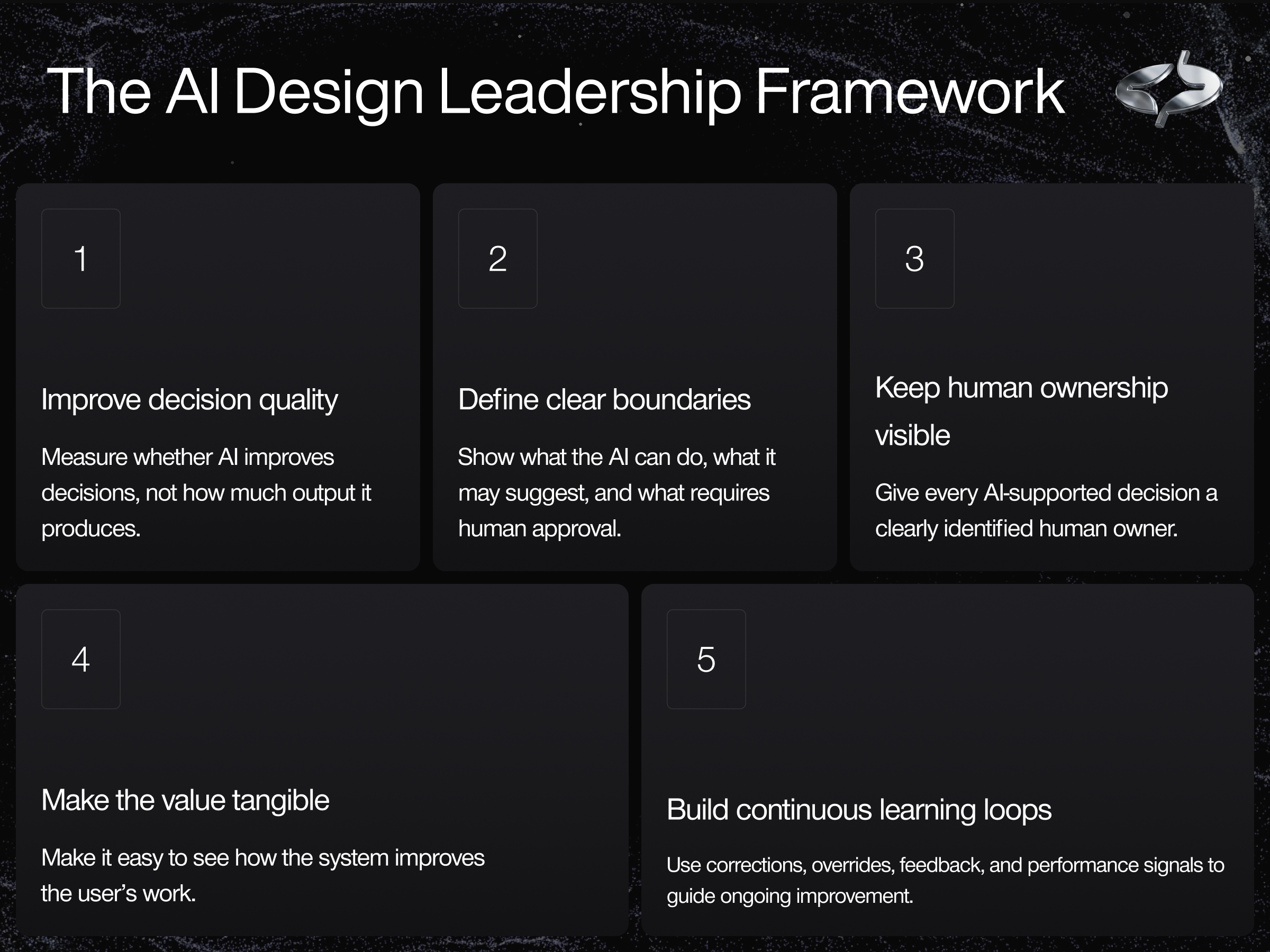
These lessons led us to implement the AI Design Leadership Framework. It brings our approach into one connected practice: make the system show its work, give it clear boundaries, place it where the work happens, design its behavior as carefully as its interface, and learn from how people use it.
For us, this is the shift from AI UX to AI design leadership. It means going beyond usable screens to shape systems that people can understand, govern, and improve with confidence.
The model may produce the recommendation. AI design leadership determines whether that recommendation is traceable, appropriately bounded, useful in the moment, and capable of improving through responsible use.
Find more Community stories on our blog Courtside. Have a suggestion? Contact stories@dribbble.com.