This is the latest in a series of posts explaining the decisions we make that affect our users, as well as the results of those decisions (positive or negative).
Dribbble exists to help service providers generate and convert leads. The purpose of everything we do – every feature, policy, and campaign – is to increase the flow of viable leads to providers of design and development services.
For the better part of two years, we have focused on helping clients find and contact the freelancers and agencies best suited to their needs, while giving service providers the levers to succeed on the platform.
We monetize the leads we deliver to service providers when they accept payments on Dribbble, subscribe to Pro, and advertise – which they will only do if they can expect to receive more leads as a result.
With leads up 150% Y/Y through May, payment volume (+180% Y/Y), Pro signups (+75% Y/Y), and advertising spend by agencies (+100% Y/Y) have risen accordingly.
As lead flow increases, it becomes even more important for service providers to identify and prioritize the clients who are most serious and ready to hire. This quarter, we have been focused on helping them do exactly that, to improve outcomes for both parties.
This has been a three-part effort to gather more information about prospective clients, highlight the clients most likely to convert, and intercept unviable leads before they reach service providers.
So far this June, releases have included:
- Ivy, an AI moderator that prevents unviable leads from reaching service providers. To determine whether a lead is viable, Ivy analyzes dozens of attributes of the client, considers how similar senders have performed historically, and evaluates the contents of the message – all within milliseconds of the message being sent. If a lead is viable, Ivy then predicts how likely that client is to convert, and we highlight high-scoring prospects to the service providers they contacted.
- Clients are now prompted to verify their phone number and payment method when contacting service providers. Although these steps are optional, clients who verify this information are much more likely to be approved by Ivy and to get the attention of more selective freelancers and agencies.
- Client Badges, which help service providers learn more about the clients requesting their services. We show providers how a client has verified their identity; whether they have hired on Dribbble before and, if so, their total spend and the average rating they received from past providers; and whether Ivy detects any other positive signals.
Taken together, these features make it easier than ever for service providers to prioritize the clients most likely to convert, and give high-intent clients a better experience in the process.
Moderation
Every year, users upload many terabytes of images, animations, and other visual content to Dribbble, and exchange millions of messages.
A critical, if often overlooked, part of operating Dribbble is reviewing this user-generated content and intercepting anything that could degrade the experience for other users.
Our top priority is to prevent spam, scam, or otherwise unviable messages from reaching service providers. We screen every lead and approve only those sent by a real person with genuine intent to purchase design and development services, and only when the message complies with our Terms of Service and Community Guidelines. The stakes are high – if an unviable lead is approved, the recipient wastes time responding; if a viable lead is rejected, the recipient misses a revenue opportunity.
Until recently, we relied on human moderators, who worked around the clock – including weekends and holidays – to approve viable leads as quickly as possible. Moderation speed matters because the longer it takes for a client to receive a response from the service provider they contacted, the less likely they are to convert.
 This graph shows the conversion rate of clients over the trailing 12 months, based on the length of time between when a client sent a request and when they received their first response from a service provider.
However, over the past year, as lead flow surged, it has become increasingly difficult to conduct a rigorous human review of each lead while keeping moderation time steady without sending our labor costs skyrocketing.
Ivy has solved this problem – and then some:
- Ivy delivers highly accurate results. While human moderators base their decisions primarily on the contents of the message, Ivy synthesizes many dozens of data points about the sender, similar senders, and the message itself before making a determination, resulting in fewer false positives and false negatives.
- Ivy makes decisions in milliseconds. Previously, human moderators required an average of 12 minutes to approve a request from a client – longer in periods of elevated lead flow. In those 12 minutes, a client may have found another solution, lost interest, or become sidetracked. Moderation decisions now occur instantly, giving lead recipients those invaluable minutes back.
- Ivy has effectively unlimited capacity. We can now handle a step function increase in lead flow from one minute to the next without affecting moderation accuracy or speed, which is not the case with human moderators.
- Ivy is always learning. Ivy continuously improves the accuracy of its moderation decisions with minimal supervision. We also encourage lead recipients to report any suspicious messages, which they can do from within the message thread, in order to accelerate Ivy’s learning process.
- Ivy is more cost-efficient. Alongside faster and more accurate moderation decisions, Ivy is also much less costly than human moderation, enabling us to redeploy that budget to other parts of the business in need of resources.
All in all, Ivy represents a major step forward for moderation on this platform, not just operationally, but in the experience we deliver to both clients and service providers. The instant approval of viable leads has a compounding effect throughout the conversion funnel, improving progression from one stage to the next and ultimately leading to better outcomes for both parties.
However, moderation is only part of what Ivy brings to the table – it also scores each viable lead based on how likely the client is to convert. This score is not just an internal metric, though we do use it to control for noise caused by low-intent or unqualified leads – it also plays a key role in which leads we highlight to service providers. More on how we use Ivy’s conversion score in the next section.
Client Badges
One of the most common requests we hear from service providers on Dribbble is for more information about the clients who contact them. Freelancers and agencies want to respond to high-intent, qualified leads without delay while minimizing the opportunity cost of engaging with clients unlikely to convert.
For example, a freelance UX/UI designer recently told me the leads he receives on Dribbble are a “lottery,” and that “you have no idea what you’re going to get until you start talking to the client.” Ideally, he said, he would know at a glance whether the client had hired on Dribbble before and, if so, how much they had spent, and whether they had verified their email address, phone number, or other details about themselves or their project.
This is a fair point. To send a request to a service provider on Dribbble, a website visitor needs only to verify their email address. It’s low-effort for clients, but admittedly it gives providers almost no insight into who is contacting them.
We could, of course, do more to pre-qualify clients. We could require them to verify more information about themselves, complete a screening call, work with an account manager, sign a contract, pre-fund their project, or pass some other filter. There is no doubt that adopting any of these measures would reduce the number of unqualified leads reaching service providers on Dribbble, but we have chosen not to do so because our priority is always to minimize friction for the client.
- Every additional click adds drag to the conversion funnel, reducing lead flow – both qualified and unqualified – to the freelancers and agencies on Dribbble. Some would argue that it’s acceptable to lose a few serious clients if it helps us suppress enough low-intent ones, but we’d rather be too permissive than cost service providers legitimate opportunities.
- Pre-screening clients, or any other form of manual intervention by our team, not only introduces friction for the client in the form of additional time and effort but also raises Platform Fees for one or both parties because of the cost to Dribbble of providing that service. Even if those fees were charged only to the service provider to avoid friction for the client, they would inevitably be passed through to the client in the form of higher prices, resulting in lower conversion.
Instead, a solution that made sense for Dribbble would need to preserve a low-friction experience for clients while also giving service providers important context about their prospective clients and, just as importantly, could not require human intervention that would result in higher Platform Fees.
That’s the context for Client Badges, which took shape incrementally over the course of June with the releases of the client-facing and provider-facing features described below.
Client-Facing Functionality:
Two weeks ago, we enabled clients to verify their phone number and payment method either before or after sending a request or publishing a Project Brief.
While optional, verifying these details indicates that a client is serious, which is especially important for highly sought-after freelancers and agencies who need to be selective about the opportunities they pursue. Verified clients are more likely to receive a response from at least one provider they contact, receive responses from multiple providers, and receive those responses sooner – for clients on a deadline, this can mean the difference between work getting underway within hours rather than days.
Clients can verify their number when sending a Project or Service Request or generating a Project Brief:

They can also verify their phone number and payment method at any point after generating their Project Brief. While this won’t factor into Ivy’s moderation decision (which will have been made by then), any approved Project Briefs already sent to providers will update automatically to display those verifications.

To be clear, we never share a client’s phone number with service providers or use it for marketing purposes. It is used solely to give Ivy, and ultimately the lead recipient, more confidence that the client intends to hire. Also, payment details are collected, verified, and stored securely by Stripe – we do not handle or store that data ourselves.
Provider-Facing Functionality:
As of last week, service providers can see important context about the clients requesting their services, including the phone and payment method verifications described above, along with other details to help them evaluate the opportunity:


The early feedback we’ve received on Client Badges has been uniformly positive. There’s always more that we could do to qualify clients, but service providers now have far more to work with than before:
- At a minimum, every client has their country and signup year displayed, along with confirmation that they verified their email address.
- Clients who have also verified their phone number or payment method, or signed up with a company email address, receive a Verified Client badge.
- Clients who have already transacted on Dribbble receive a Returning Client badge – at a minimum, they have a verified email address and payment method, and have successfully collaborated with a service provider on the platform. We display the number of projects they’ve completed, their total spend, and the rating they’ve received from other providers they worked with.
- Clients who have not previously transacted on Dribbble but have received a high conversion score from Ivy – due to some combination of positive signals – receive a Promising Client badge.
Related Updates
In addition to the features described above, we made other improvements to the conversion funnel that increase their impact:
New Homepage
Clients who use InstantMatch to contact service providers typically share more about their project and their business than clients who reach out directly to providers they find in search. These additional inputs help Ivy moderate and score leads more accurately, increasing the likelihood that qualified clients will be highlighted in service providers’ inboxes. InstantMatch also enables us to distribute leads to the service providers who are best suited to a client’s needs and who most support the growth of the platform.
We redesigned our homepage, the most-visited page of the website, to give top billing to InstantMatch (previously, the primary call to action was search):
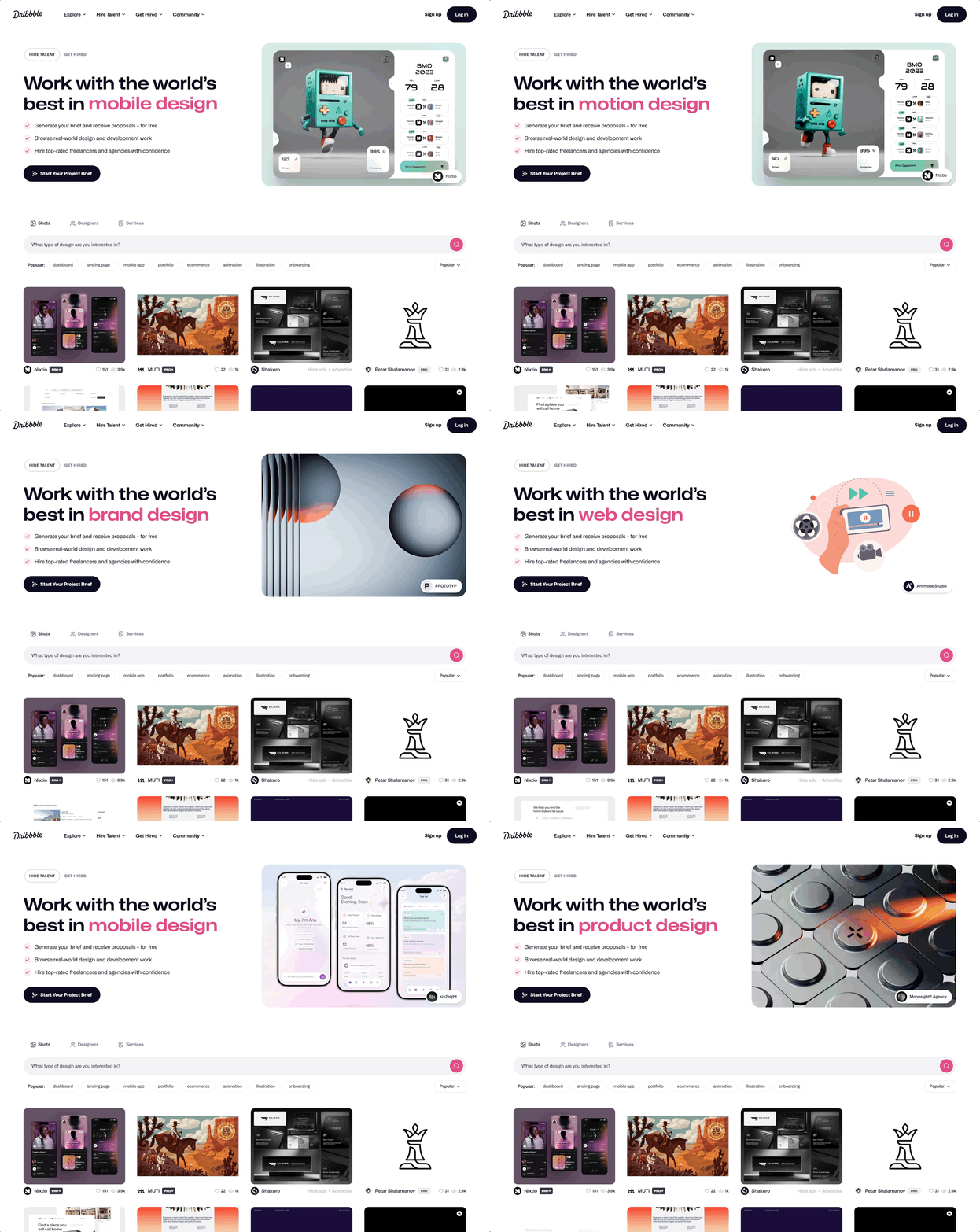
In an A/B test against the previous, search-centric version of the homepage, the new version delivered some important wins:
- 30% more clients sent at least one lead.
- 50% more leads overall and 80% more through InstantMatch specifically.
- 10% more service providers and 20% more Pro subscribers received at least one lead.
Browser Notifications
By reducing moderation time to a matter of milliseconds, Ivy has increased the likelihood that a client converts at all. Which service provider wins that client, however, still depends in large part on who responds first.
Client Badges give providers more context on who is contacting them and help them prioritize accordingly, but they are still competing against every other provider the same client contacted. The first provider to respond is far more likely to win that client than the second, let alone the third or fourth.
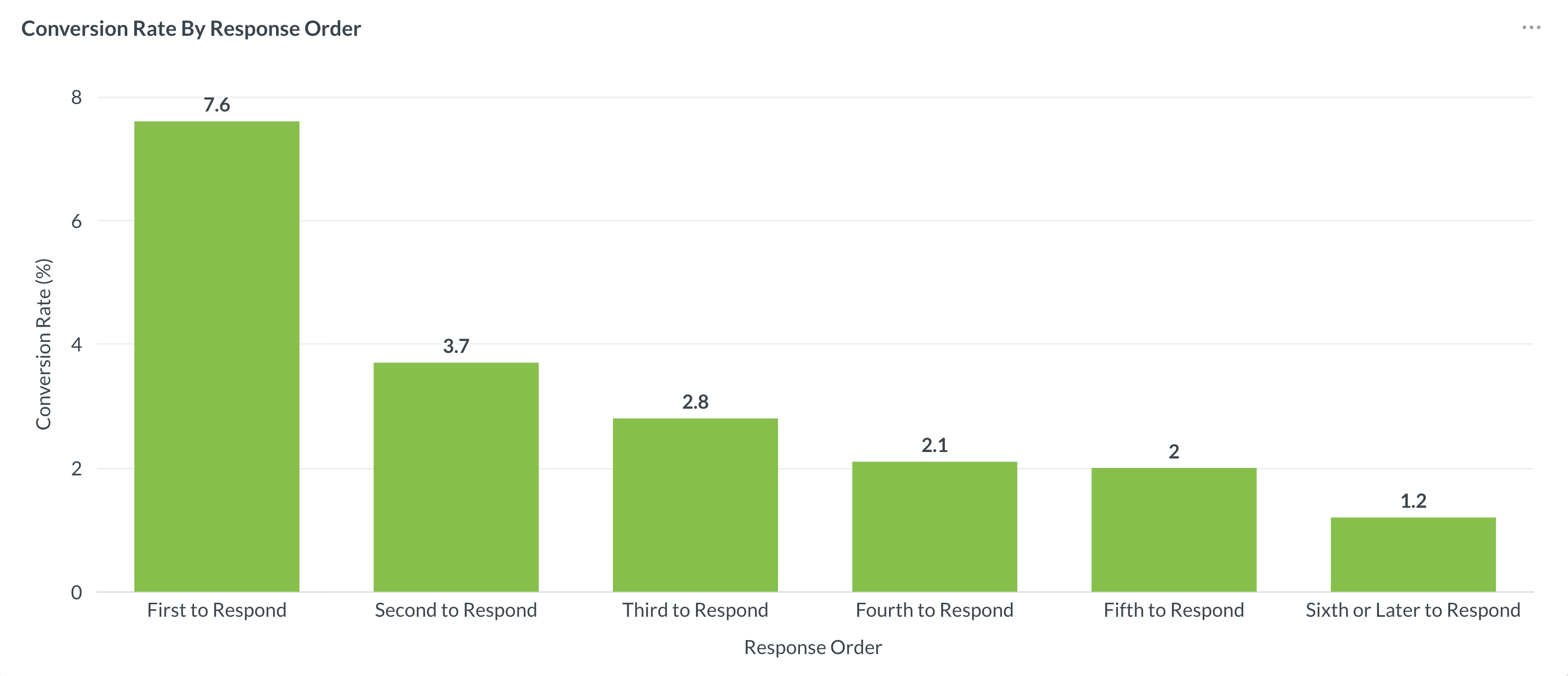 This graph shows the conversion rate of clients over the trailing 12 months, based on the order in which the selected provider responded.
Service providers can now receive browser notifications the moment a client contacts them. This is an opt-in feature for providers who want to improve their response time – the faster they respond, the more likely they are to land the client.
With browser notifications enabled, freelancers and agencies on Dribbble are alerted as soon as they receive a request from a client, as well as when there is any other project activity – for example, if a client has follow-up questions or edits to a proposal. This feature is available to both Pro and non-Pro subscribers and works on the most popular browsers, including Chrome, Safari, Firefox, and Edge.

To begin receiving alerts, service providers should enable browser notifications here. For more details, visit the Help Center.
What’s Next
Follow-on work to Client Badges is already underway, including:
- Giving clients more ways to verify their identity before or after they contact a service provider.
- Enabling Pro subscribers to filter the Project Briefs feed by Client Badges (or specific client attributes).
- Refining Ivy’s models to improve accuracy. Separately, we’re also extending Ivy’s capabilities beyond screening and scoring leads to handle all types of content moderation.
More to come soon!