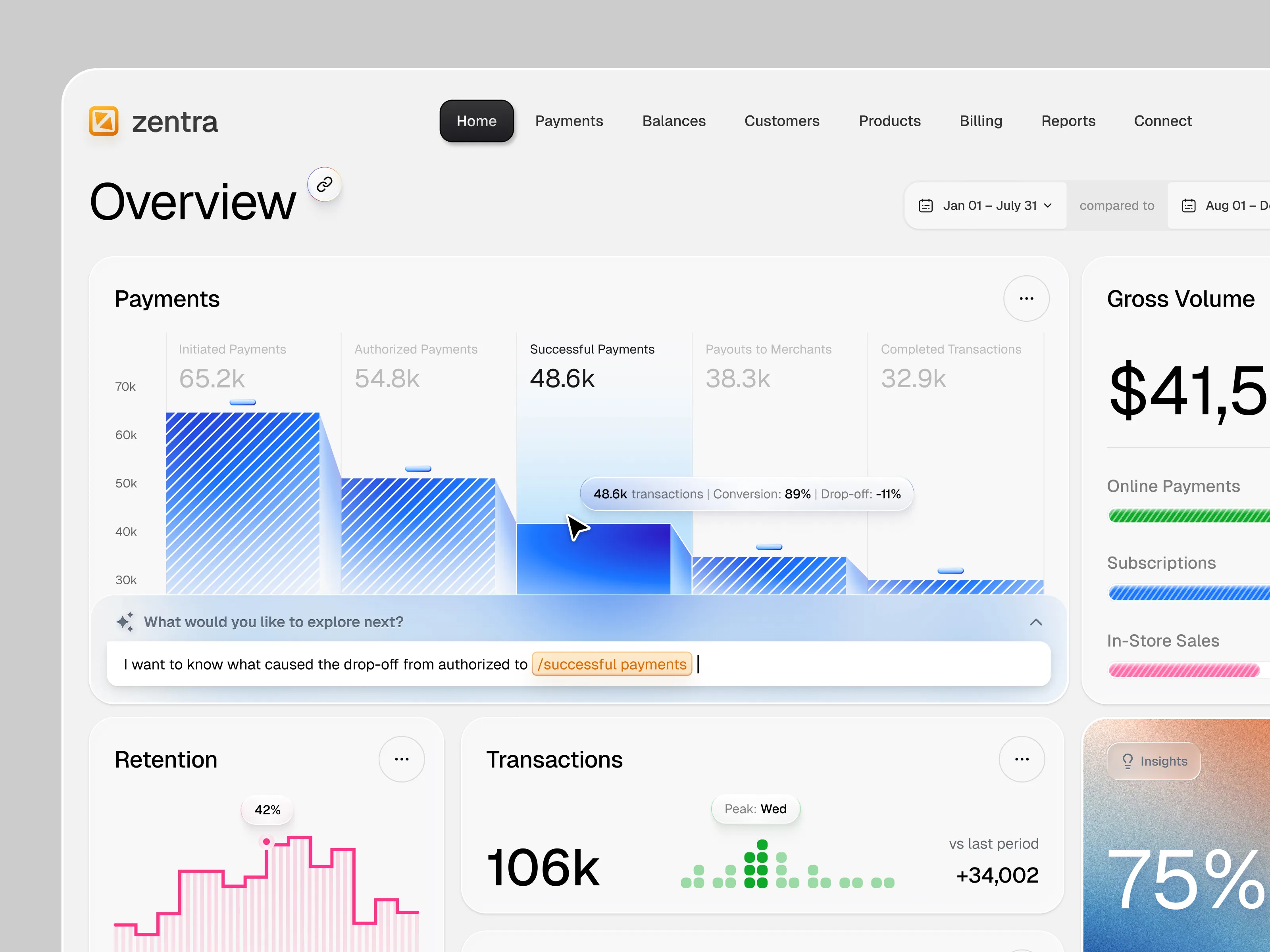
About this Service
AI features are easy to add and hard to make usable.
A model can generate text, recommendations, summaries, classifications, or actions — but users still need to understand what the AI is doing, what they can trust, what they should review, and what happens when the output is incomplete or wrong.
UITOP designs AI-powered SaaS products, enterprise AI tools, copilots, agent workflows, AI dashboards, conversational interfaces, and AI features inside existing B2B software.
We turn model outputs and automation into interfaces that are clear, reviewable, and connected to the work users already do.
The goal is not to put a chatbot in the corner. It is to design where AI should assist, where it should automate, where a human should stay in control, and how the product communicates uncertainty, progress, and next actions.
What You Get
AI product UX strategy
User-flow design for AI-assisted and automated workflows
Prompt, input, and command interaction design
AI output, recommendation, and result-state design
Copilot and assistant UX
Agent and multi-step workflow design
Human-in-the-loop review, approve, edit, retry, and override patterns
Loading, streaming, progress, error, and fallback states
Confidence, source, status, or explanation patterns where the product needs them
High-fidelity Figma screens for key AI workflows
Interactive prototypes for testing AI interaction concepts
AI-specific components added to your existing design system
Developer-ready states, specs, and interaction documentation
2026-ready AI workflow: A modern design process built on AI integrations and faster product iterations.
AI Products and Features We Design
AI SaaS platforms
Enterprise AI tools
AI copilots
AI assistants
AI agents
Agentic workflows
Conversational AI
Chat interfaces
AI-powered dashboards
Recommendation systems
Search and retrieval interfaces
Document analysis tools
AI-generated reports and summaries
Classification and review workflows
AI automation inside CRM, ERP, and operations software
AI features added to an existing SaaS product
Common AI UX Problems We Solve
Users do not know what the AI can and cannot do
AI output is shown as a large block of text with no clear next action
Users cannot easily edit, approve, reject, or retry a suggestion
Long-running AI tasks provide too little progress feedback
Automated actions happen without enough visibility or control
Prompt inputs require users to understand the model instead of the product
AI recommendations are disconnected from the workflow where decisions happen
Errors and low-confidence states are handled like normal system errors
Copilot functionality competes with the core interface instead of supporting it
Existing SaaS products add AI features without a shared interaction system
What You Can Expect
Workflow-first AI designWe start with the task users are trying to complete and decide where AI belongs in that workflow.
Human control where it mattersReview, edit, approve, retry, cancel, and override actions are designed explicitly when the workflow requires them.
Clear AI statesLoading, streaming, partial results, tool use, failures, and background tasks are treated as product states, not edge cases.
Existing-product compatibilityIf AI is being added to a mature SaaS platform, we design it around the product users already know.
Developer-ready handoffYour engineering team receives component states, interaction rules, and specifications for the AI behavior represented in the interface.
Tools
Figma for UX/UI design, prototyping, component systems, and developer specifications
Claude and ChatGPT for workflow exploration, prompt-structure analysis, and prototype logic
Gemini for language exploration where alternative phrasing or conversational behavior needs testing
Lovable, Magic Patterns, v0, or Bolt when functional prototypes help test interaction concepts
Slack or Teams for communication
Figma-to-Claude MCP workflow: Where useful, approved Figma components can be connected to an AI-assisted implementation workflow to accelerate design-to-code handoff.
If your team already uses a specific model provider, prototyping stack, analytics tool, or development environment, we adapt to your existing workflow.
Process and Communication
AI UX is not a separate visual layer. We design the interaction between the user, the product, and the model.
1. Discovery. We review your users, product workflows, model capabilities, data sources, and the AI functionality you want to introduce.
2. AI Opportunity Mapping. We identify where AI should assist, recommend, automate, generate, or stay out of the way.
3. Interaction Model. We define how users invoke AI, provide context, review results, correct outputs, and recover when something goes wrong.
4. Information Architecture. We decide where AI belongs inside the existing product so it feels connected to the workflow rather than added on top.
5. Wireframing. We test prompt inputs, generated outputs, review states, tool actions, and fallback behavior before visual design.
6. UI Design. We create high-fidelity screens for primary AI workflows and important states.
7. Prototyping. We connect key interactions into a clickable or functional prototype for realistic scenario testing.
8. Design System & Handoff. AI-specific states and components are documented so engineering can implement consistent patterns across the product.
AI Interaction Patterns We Design
Prompt and command inputs
Suggested prompts and contextual actions
Streaming responses
Inline AI suggestions
Accept / reject / edit flows
Regenerate and retry behavior
Source and citation presentation
Confidence or uncertainty states
Background agent progress
Multi-step agent workflows
Tool-use visibility
Human approval checkpoints
Error and recovery states
AI-generated tables, summaries, and reports
Conversational and non-conversational AI interfaces
Adding AI to an Existing SaaS Product?
You do not need to rebuild your product around a chatbot.
We can identify where AI fits into existing workflows and design the interaction so users can access assistance in the context of the task they are already performing.
That can include:
an AI copilot inside an operations workflow;
generated recommendations inside a dashboard;
automated document or record analysis;
AI-assisted forms and data entry;
background agents with review checkpoints;
AI search across complex product data;
or a new AI-native module inside an existing platform.
Why It Matters
Model output is not yet a product experience
Users need structure around generated content: context, actions, status, editing, and recovery.
AI introduces uncertainty
Traditional software usually produces deterministic states. AI products need patterns for partial, ambiguous, or low-confidence outputs.
Automation changes user control
The more work AI performs in the background, the more important it becomes to show what happened and where human review is required.
AI needs to fit the workflow
The strongest interaction is not always a chat interface. AI can appear as an inline suggestion, recommendation, background action, review queue, search layer, or assisted workflow.
Starting Scope
The listed price represents a typical starting AI product design engagement.
Final scope depends on the number of AI workflows, user roles, states, model behaviors, product modules, and the fidelity required for prototyping.
Existing SaaS platforms with multiple AI features can be scoped incrementally, starting with one critical workflow.
Not sure whether your product needs a copilot, agent, inline AI feature, or a different interaction model? Send us your current product and AI use case. We'll help define a practical first workflow to design.